ACM Extended
Ten modules for injuries and access, blood fridges and Megacode Kelly.
Choose a module, configure a casualty, place blood supplies and run a Megacode Kelly exercise.
Ten modules for injuries and access, blood fridges and Megacode Kelly.
Ten modules for blood volume, oxygen, pain, rhythm, chest injury, wake-up, plot armor and full heal facilities.
Drop patient modules directly on the intended person. Place the fridge and training manikin at their intended world position. Confirm the resulting findings before trainees begin.
Most injury modules act immediately and remove their placement marker. TBI, IV and fridge modules open a setup dialog. A clear or wake-up action only changes its named state; use the reset reference before repeating a scenario.
Open the Zeus module list and choose ACM Extended. The following eight modules target a casualty; the fridge and manikin modules are covered below.
| Module | Selection or effect | What to verify |
|---|---|---|
Inflict Pulmonary Edema | Immediately sets a random 0.9 to less than 1.5 L of fluid overload on a living casualty. No severity dialog. | Edema creates recruitable shunt. Follow oxygenation, delivered ventilation and perfusion; see Ventilator Settings & Tips. |
Clear Pulmonary Edema | Sets fluid overload to zero. | Blast lung injury, pleural air and pleural blood remain separate problems. |
Inflict Blast Lung | Adds a random 0.45 to less than 0.85 severity. Repeat placement adds to the existing injury, capped at 1. | Can also trigger pneumothorax. Assess the chest and actual ventilation. There is no dedicated Clear Blast Lung module in this list. |
Inflict Junctional Bleed | Creates a junctional bleed on a random arm or leg that does not already have one. | Repeat to involve another limb. Once all four have a junctional wound, another placement adds none. Use direct pressure, packing, wrapping or AAJT-S as applicable. |
Induce / Clear Obtundation | Toggles the manual awake obtunded state on a living player. AI is rejected. | Place again to clear it. Automatic physiological recovery excludes a manually induced episode; see Obtunded states. |
Inflict TBI | Opens the severity and initial state dialog. Requires a living casualty. | Severity and initial ICP state are independent choices. A fresh injury starts Acute and Struct at the chosen severity and reinitializes autoregulatory and autonomic state. Reapplying this module replaces the TBI state; it does not simulate a repeat head impact. |
Clear TBI | Removes the TBI state, including Acute, Struct and the new integrity/tone values, and clears associated TBI flags and vital sign offsets. | It does not clear unrelated chest injuries, medication or blood loss. |
Place IV | Opens the limb, site and gauge dialog. Can target a living or dead person. | Refuses an already occupied IV site. Creates a removable catheter hub; does not attach a fluid bag. |
Available ACM Extended modules · Edema amount · Blast lung amount · Stacking and associated pneumothorax
The slider sets both the initial acute burden and structural injury severity. The state selector separately sets initial ICP and whether the herniation sequence is already active. Selecting Severe here does not automatically create severe structural injury: confirm the severity slider as well. The new controller derives its starting integrity from structural severity on its first update.
| Initial state | ICP with default settings | Starting condition |
|---|---|---|
Mild | 10 mmHg | Starts at the configured base ICP. |
Moderate | 15 mmHg | Starts 5 mmHg above the base. |
Severe | 27 mmHg | Starts 3 mmHg below the configured herniation threshold. |
Herniating | 35 mmHg | Starts 5 mmHg above the threshold with herniation active, stage 1 and pupil state 1. |
These ICP values change if the mission changes the base or herniation threshold. The herniating preset also seeds its herniation clock with the configured stage duration. Use the TBI reference to follow the subsequent course.
On a stable test casualty, use severity 0.25–0.30 for mild injury or 0.50–0.55 for moderate injury. Follow Acute falling while Struct remains, and ICP returning toward baseline. A severe structural test uses severity above 0.60 through 0.80; critical is above 0.80.
Read Autoreg, Auto, CPP and Perfusion OK alongside oxygen delivery and ventilation. Good pressure alone does not clear a delivery deficit. The recovery guide explains each gate, and the debug reference explains the fields.
TBI setup and clearing checked at ACM Extended dev revision 98d18bb: fresh injury and ICP presets · structural and acute initialization · first update and recovery · Clear TBI.
TBI preset behavior · Independent severity and state controls
Rows that do not apply to the chosen limb are greyed and cannot remain selected. Switching to the neck selects the left EJ if the prior selection was a limb height. This module places IV or EJ access; its dialog does not place an IO. See the IV/IO decision guide when planning separate medication and fluid routes.
IV placement, occupied site check and removable hub · Valid site choices
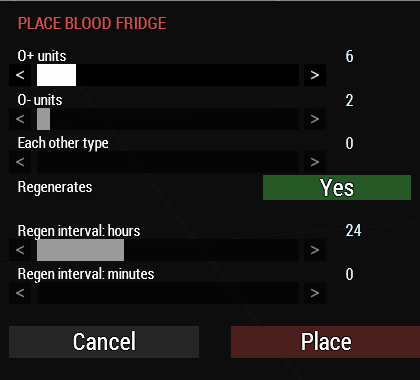
Choose ACM Extended > Place Blood Fridge in Zeus, place it at the intended supply point, then configure the popup and select Place. Cancel closes the setup without spawning a fridge.
| Field | Default / range | Effect |
|---|---|---|
O+ units | 6 / 0–40 | Number of 500 mL O positive blood units. |
O− units | 2 / 0–40 | Number of 500 mL O negative blood units. |
Each other type | 0 / 0–40 | Applies that count separately to A+, A−, B+, B−, AB+ and AB−. A value of 2 adds 12 units, not two units shared between those types. |
Regenerates | Yes / Yes or No | Yes allows restocking at the configured interval. No leaves a finite supply. |
Regen interval: hours | 24 / 0–72 | Hours of in game elapsed time between restocks. |
Regen interval: minutes | 0 / 0–59 | Minutes added to the hours field. Set both fields to zero to disable regeneration. |
Set the required stock and choose Regenerates: No. Every withdrawal reduces the remaining stock.
Choose Yes and a positive interval. Each fridge refills to its own configured stock when its interval expires.
The interval follows mission date/time progression. Twenty four in game hours can pass faster than 24 real hours.
Restocking restores the configured load; it does not add another full load to whatever remains. The timer starts after placement and follows the individual fridge's elapsed interval. It is not a shared midnight refill.
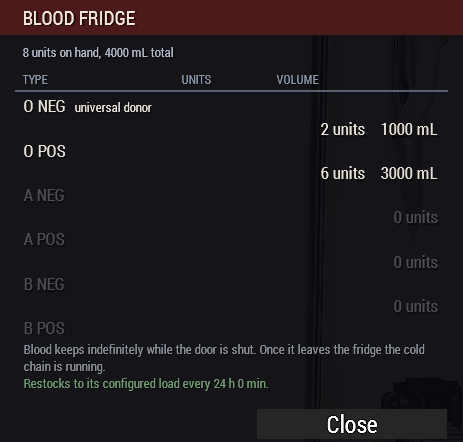
Zero stock types remain visible in grey on the contents screen. The Take Blood Unit submenu lists only types with stock remaining. Check Contents reads the stock when opened; reopen it after withdrawals to check the latest counts.
Blood remains stocked in the fridge without a loose bag aging timer. Once withdrawn, the blood cold chain rules apply. Carrying a cooler alone does not guarantee a loose bag is protected: confirm the blood is stored inside it.
Placement module versus fridge models: Place Blood Fridge is the selectable placement tool. Blood Fridge (Stocked) and Blood Fridge (Open) are the internal closed/open object models used by that tool, not separate exposed Zeus placement variants.
The module's Eden/scripted path supports individual counts for all eight blood groups. Those attributes are O− 2, O+ 6 and zero for A−, A+, B−, B+, AB− and AB+ by default.
Restock periodically defaults to enabled. Regen interval (in game minutes) defaults to 1,440. A value of 0 disables regeneration; −1 uses the addon option interval. This is separate from the live Zeus popup, whose count and hour/minute sliders open at the displayed defaults.
A per fridge interval overrides the addon interval. The blood cold chain system must be enabled for the fridge's automatic door/restock tick to run. A zero interval stops actual regeneration even if a contents footer describes an interval of 0 h 0 min.
Place Spawn Megacode Kelly at the training location. It creates a gearless, lying casualty with an instructor laptop nearby. Use the laptop's ACE interaction Megacode Control Panel to open the instructor controls.
| Tab or button | Available controls | How to use it |
|---|---|---|
VITALS | HR 0–260; SpO2 0–100; systolic BP 0–260; diastolic BP 0–160; RR 0–60; EtCO2 0–90; temperature slider 300–420. | Sliders apply changes as they move. Monitored vital targets ease toward the chosen value. Temperature is entered as °C × 10: 370 means 37.0°C. |
RHYTHM | Sinus, Sinus Tach, Sinus Brady, A-Fib, A-Fib RVR, Atrial Tach, SVT, V-Tach, Torsades, V-Fib, Asystole and PEA. | Choose the rhythm, then reassess pulse and perfusion. Arrest selections change the manikin's arrest state as well as its display. |
AIRWAY | Patent, Blood Obstruction, Vomit Obstruction, Airway Collapse, Apnea, Pneumothorax, Tension Pneumo, Hemothorax and Decompress / Clear. | Use these to set the breathing problem independently of the selected rhythm. |
WOUNDS | Head, torso and each limb; Laceration, Gunshot, Avulsion, Amputation, Burn, Crush, Velocity/Frag, Spawn Axilla, Spawn Inguinal and Clear All Wounds. | Pick a region before a wound type. Junctional buttons use their supported arm or leg sites. |
NEURO/+ | ICP 0–60 mmHg, GCS 3–15, Herniation (Cushing + coma), Make Unconscious / Wake Up. | GCS below 9 makes the manikin unconscious. The ICP control above 20 changes the training heart rate and blood pressure targets. |
SCENARIO | Seven timed deterioration sequences and STOP SCENARIO. | Use the table below to choose a sequence. Stop it before taking over the values manually. |
LOG | Instructor activity entries, newest first. | Review applied changes and announced scenario stages. |
RESET | Stops the scenario and restores the manikin's baseline wounds, training vitals, rhythm, airway and neurological controls. | Use between attempts. Verify any attached equipment and medications before treating the next attempt as identical. |
DONE | Closes the control panel. | Closing the panel does not issue STOP SCENARIO. |
Instructor driven simulation: the panel sets training values and selected live medical states. It is not a free running ordinary casualty. The scenario labels describe the exercise; they do not establish that every named disease process or ECG feature has a separate simulation behind it.
Times below use the default pace of 1. Each stage is checked about once per second. A pace multiplier of 2 doubles the stage times; 0.5 halves them.
| Scenario | Scheduled progression | Instructor focus |
|---|---|---|
ACS > VF arrest | Start with tachycardia; hypotensive stage at 45 s; VT at 90 s; VF at 120 s. | Rhythm recognition and the transition from a perfusing rhythm to arrest. |
Tension pneumo > PEA | Pneumothorax at the start; tension at 40 s; PEA at 85 s. | Chest assessment, decompression and perfusion reassessment. |
Hemorrhage > PEA | Bilateral leg junctional bleeds at the start; worsening shock at 40 s; PEA at 90 s. | Hemorrhage control, access and resuscitation planning. |
Hyperkalemia > VF | Sinus at the start; bradycardia at 40 s; VF at 80 s. | Rhythm progression. The timed script does not itself set a potassium concentration. |
Rising ICP > herniation | Raised training ICP at the start; Cushing stage at 45 s; coma/herniation at 95 s; asystole at 135 s. | Neurological trend and deterioration. This sequence is separate from the ordinary casualty TBI progression model. |
Hypoxia > bradyasystole | Airway collapse and hypoxia at the start; bradycardia at 40 s; asystole at 80 s. | Airway treatment, ventilation and reassessment. |
Septic shock > PEA | Fever and shock pattern targets at the start; lower pressure at 50 s; PEA at 100 s. | Recognition of deterioration and preparation for arrest. |
STOP SCENARIO stops future scripted stages. It does not undo injuries or values already applied. The sequence advances by elapsed time, so treatment does not automatically cancel its next scheduled deterioration. Stop or reset it when the exercise calls for a different course.
The manikin has training specific death protection. By default, 240 accumulated pulseless seconds without CPR trigger the simulated death/reset sequence; active CPR pauses that clock. The configured death display lasts 3 seconds before reset. A genuinely dead manikin is replaced through the respawn path.
Laptop interaction · Tabs and controls · Scenario stage times · Scheduled behavior · Reset scope
These ten modules appear under ACM Modules. Patient modules require a living person. Assign Full Heal Facility instead targets a living building.
| Module | Fields or action | Practical limit |
|---|---|---|
Set Blood Volume | Blood, plasma and saline sliders, each 0–6 L in 0.1 L steps. They open at the casualty's current values. | Sets the three compartments directly. It does not administer a bag or stop ongoing bleeding. |
Set Oxygen | Oxygen level slider 0–100%, opening at the current saturation. | Changes the current SpO2 value. Persistent airway, breathing or perfusion problems can move it again. |
Give Pain | Pain slider 0–1 in 0.01 steps, opening at current pain. | Adjusts pain toward the selected value. It does not create the wound that would ordinarily explain it. |
Set Blood Type | O+, O−, A+, A−, B+, B−, AB+ or AB−; starts from the stored blood type. | Changes the blood group value and clears cached dog tag data so it can refresh. |
Inflict Cardiac Arrest | Target Rhythm: Sinus, Asystole, Ventricular Fibrillation, Ventricular Tachycardia or Random. | The VT option selects pulseless VT. Random chooses among asystole, VF and pulseless VT. Sinus requests ROSC instead of inflicting arrest. |
Un-Cardiac Arrest | Requests the ordinary ROSC transaction. | The current ROSC eligibility gate still applies. This is not an unconditional full heal. |
Force Wake-up | If in arrest, sends the CPR success transition, then clears the Zeus knockout flag and requests wake-up. | Use deliberately for scenario control. It does not repair the underlying injuries or restore every abnormal value. |
Inflict Chest Injury | Pneumothorax, Tension Pneumothorax, Hemothorax or Tension Hemothorax. | No side selector. Tension pneumo sets the native tension state; tension hemothorax seeds 1.2 L of pleural fluid. Examine the resulting chest findings. |
Toggle Plot Armor | Toggles instant death immunity and the per unit AI unconsciousness flag together. | It does not remove wounds, pain or blood loss and is not a promise of protection from every death path. |
Assign Full Heal Facility | Drop on a living building to add the full heal interaction. | Players use the added ACE interaction. Its default interaction distance is 5 m; nearby casualty choices are collected within 5.5 m. Casualties already claimed by evacuation are excluded from the individual list. |
Choose an explicit rhythm or chest injury before confirming those dialogs. The module configuration does not supply a patient matched initial selection for either list.
Available ACM module definitions · Field ranges and choices · Module handlers · Current ROSC gate · Full heal interaction
Clear TBI removes the full TBI state, including structural history, acute burden and controller state, plus its associated offsets. Clear Pulmonary Edema removes fluid overload. Place Induce / Clear Obtundation again to clear a manual obtunded episode.
For Megacode Kelly, use STOP SCENARIO to halt future stages or RESET to restore the training baseline. DONE only closes the panel.
Check blood compartments, bleeding, rhythm, oxygenation, TBI, blast lung, medication effects and attached devices. Record the starting state before the next attempt.
A module can report that its action was applied while another condition still drives abnormal findings. Match the reset to the finding you are trying to remove, then reassess the whole casualty.
Module availability, dialogs and handlers checked against ACM Extended revision 21f8694. Screenshot examples are the original images supplied for this guide. The documented module list covers the 10 ACM Extended modules and 10 ACM modules declared in that source.